How-tos
You can read about general customization rules in the corresponding article.
Customizing the Text/Background color toolbar buttons
By default, the Text color and Background color buttons have the color resetting button in the suggest popup with colorboard.
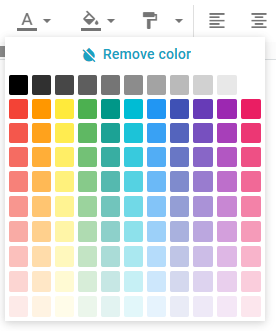
You can turn this button off, if needed. There are several ways you can choose from, for example:
- setting
clear:falsefor the suggest with colorboard in the configuration of the corresponding toolbar button:
webix.ui({
    view: "editor",
    value: "<p>Some text</p>",
    toolbar: {
        font:[
            {
                view: "rt-editor-colorpicker",
                css: "webix_rte_toolbar_button",
                name: "text-color",
                width: 60,
                source: "color",
                topIcon: "rti-color-text",
                tooltip: "Text color",
                suggest:{
                    type:"colorboard",
                    body: {
                        clear:false
                    }
                },
            },
        ]
    },
    upload: "https://docs.webix.com/editor-backend/images"
});
- customizing the toolbar view by overriding the
init()function in a JetView class:
class Toolbar extends editor.views["topbar/toolbar"] {
    init(view){
        const color = view.queryView({name: "text-color"});
        if (color) {
          const cboard = color.getPopup().getBody();
          cboard.define({ clear: false });
          cboard.refresh();
        }
        super.init();
    }
}

webix.ui({
    view: "editor",
    value: "<p>Some text</p>",
    upload: "https://docs.webix.com/editor-backend/images",
    override: new Map([
        [editor.views.topbar, Toolbar]
    ])
});