borderCollapse
defines the way of applying borders to cells
boolean borderCollapse;
Example
webix.ui({
  view:"spreadsheet",
  toolbar:"full",
  borderCollapse:true,
  prepareData:true,
  sheetStubs:true
});
Default value:
falseDetails
There are two modes of applying borders to cells:
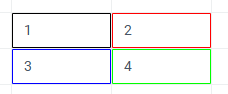
borderCollapse: false- (default) each cell has its own borders
borderCollapse: true- borders are shared between adjacent cells in the Excel-like style
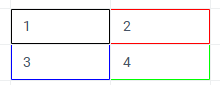
In this mode, the border between two neighboring cells is owned by the right cell (for vertical borders) or the bottom cell (for horizontal borders). As an exception, the top and left borders can be set on the starting (top-left) cell of a bordered range.
When using borderCollapse: true, make sure the loaded data has no conflicting borders (for example, a cell with a bottom border and the cell directly below it with a top border). To resolve such conflicts automatically, enable the prepareData: true setting.
See also
Articles