sortRange
sorts a range of cells
void sortRange( [string range,string|object config] );
| range | string | optional, the range of cells that should be sorted, `null` to sort the selected range |
| config | string|object | optional, the sorting direction: "asc" or "desc" ("asc" by default) or an object for configuring multi-column sort |
Example
// sorts the specified range in the default ("asc") order
$$("ssheet").sortRange("B2:B4");
// sorts the specified range in the descending order
$$("ssheet").sortRange("B2:B4", "desc");
// sorts the selected range in the descending order
$$("ssheet").sortRange(null,"desc");
// sorts the range A1:C10 by column B (ascending), then by column C (descending)
$$("ssheet").sortRange("A1:C10", {
    hasHeaders: true,
    levels: [
        { column: "B", direction: "asc" },
        { column: "C", direction: "desc" }
    ]
});
Related samples
Details
The range parameter doesn't support multiple ranges.
The object for configuring multi-column sort in the config parameter has the following structure:
{
    hasHeaders: boolean;
    levels: [
        { column: string | number, direction: string },
        ...
    ]
}
The default values of the config set as an object are:
{
    hasHeaders: false,
    levels: [
        {
            column: range.start.column, // id of the first column of the sorted range
            direction: "asc"
        }
    ]
}
where:
hasHeaders- (boolean) false by default. The code representation of the checkbox in the Custom Sort dialogue:
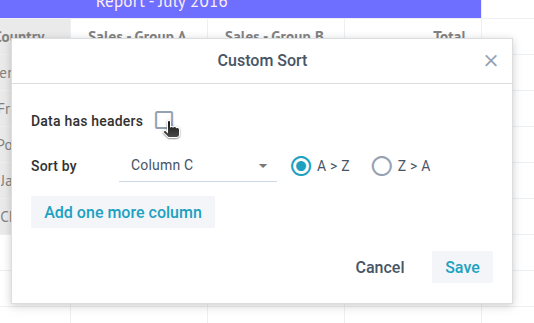
If true, the first row of the selected range of cells would behave as the headers and the names of these headers will be displayed in the Sort by dropdown list
instead of plain Column A, B, C:
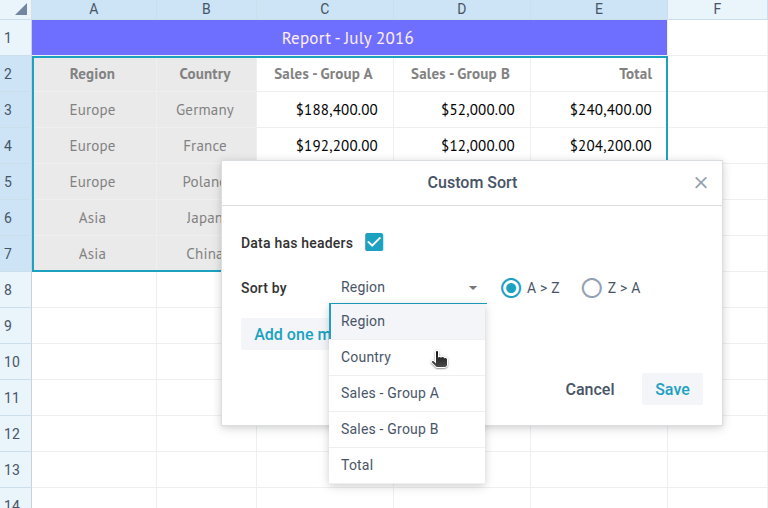
levels- (array) represents an array of columns' objects to sort the data at. Each column object includes:column- (string|number) required, the column ID as a string (e.g.: "A", "AA" or "X", etc.) or a number (1, 2, etc.)direction- (string) optional, the sorting direction: "asc" or "desc" ("asc" by default)
The order of levels matters. This is the order in which column sort config is going to be applied to data. The 2nd+ levels are so-called tiebreakers and applied only if the previous comparison ended in a tie (both equal).
See also
API
Articles
If you have not checked yet, be sure to visit site of our main product Webix lightweight js framework and page of web based spreadsheet product.